Page 6 of 16

CH341 EEPROM and SPI Flash Programmer

There is a links to tested working software and drivers with this programmer.

All drivers should work on all Windows versions: Xp, Vista, 7, 8, 8.1, 10 on both 64 bit and 32bit versions (x86).
Main page drivers download from winchiphead: http://www.winchiphead.com/download/

CH341PAR Programmer mode Driver

Jumper on Pin 1 and 2. To install via setup.exe you have to first connect the programmer.
You have to first disable check signed drivers on windows 8, 8.1 and 10!
(pull Shift and click to restart > Troubleshoot > Advanced options > Startup Settings > Restart again > On the Startup Settings screen press 7 or F7 to disable driver signature enforcement.)
Tested drivers on Windows 10 64 bit:
; CH341WDM.INF
; Driver for CH341 (USB=>EPP/I2C/SPI... chip) V2.2
; WDM for Windows 98/Me/2000/XP/Server2003/Vista/64bit Vista/Server2008/Win7/64bit Win7
; Copyright (C) W.ch 2001-2009
[...]
DriverVer = 06/05/2009, 2.2.2009.06
[...]
USB\VID_1A86&PID_5512&REV_0304
USB\VID_1A86&PID_5512

Link:
http://www.mediafire.com/download/4lndgg9owaugysp/CH341PAR-2.2.ZIP
with preinstallation option:
http://www.mediafire.com/download/ac16rptr36eo33p/CH341PAR-drivers%282%29.zip

Other Drivers and libraries for Android, Linux and MacOS:
http://www.mediafire.com/download/j2qv4jr7neqi2r7/CH341PAR-ANDROID.zip
http://www.mediafire.com/download/35lnjtuaulybuqs/CH341PAR-LINUX.zip

CH341SER Serial mode Driver

Jumper on Pin 2 and 3. Disable force signed drivers like described above.
USB-SERIAL CH340 driver included too. Install manually or run setup.exe from CH341SER directory (not from install).

; CH341SER.INF
; Driver for CH341 (USB=>SERIAL chip) V3.4
; WDM&VXD for Windows 98/Me/2000/XP/Server2003/Vista/64bit Vista/Server2008/Win7/64bit Win7
; Copyright (C) W.ch 2001-2014
;
[...]
DriverVer = 08/08/2014, 3.4.2014.08
[...]
USB\VID_1A86&PID_5523&REV_0304
USB\VID_1A86&PID_5523

Link:
http://www.mediafire.com/download/8tr22eu65qt62pw/CH341SER-3.4.ZIP

Other Serial Drivers and libraries (Linux, MacOS, Android):
http://www.mediafire.com/download/atldfbvvb1a5bl6/CH341SER-MAC.zip
http://www.mediafire.com/download/em654fj2h9j1m14/CH341SER-LINUX.zip
http://www.mediafire.com/download/hzwoyhwpxwm51ic/CH341SER-ANDROID.zip

Other downloads:
CH341DP version 1.3 (serial mode)
SPI, I2C downloader, TTL, RS232 for AT89S5X, AVR-MEGA microcontroller
http://www.mediafire.com/download/137pu9fhee80d0o/CH341DP.ZIP

CH341EVT – evaluation board and example uses
Speed testing software. eeprom writer demo and other source codes and libs.
http://www.mediafire.com/download/rj2l97lvzml7ydz/CH341EVT-1.1.ZIP

Printer driver?
http://www.mediafire.com/download/sum76rgcaet7p9z/CH341PRT-1.2.ZIP

Working programmer software
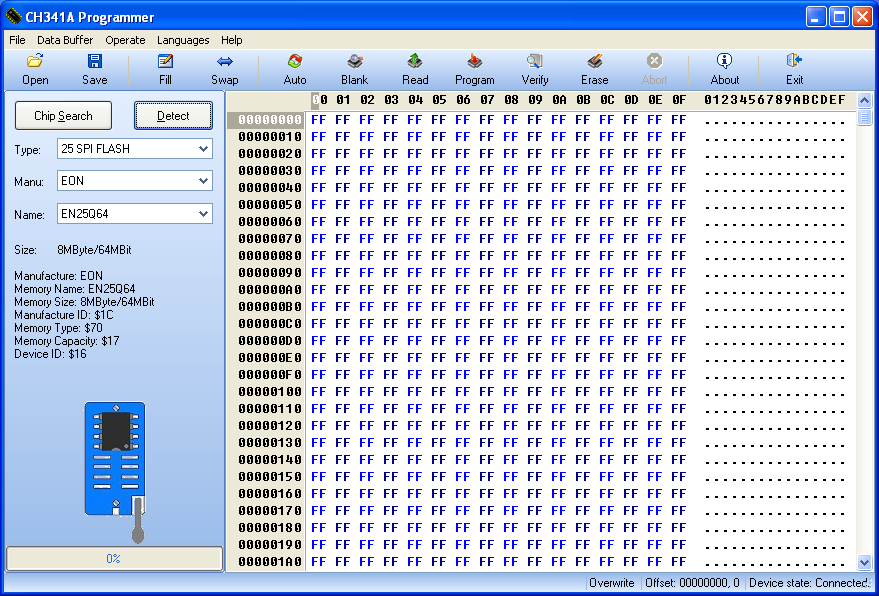
ch341 programmer software 1.18
on Windows 10 work versions 1.29, 1.26, 1.16 and 1.13:

CH341A Programmer 1.29
http://www.mediafire.com/download/v7yp367795dz877/CH341A-programmer-software-1.29.zip

CH341A Programmer 1.26 (working only CH341AFree.exe)
http://www.mediafire.com/download/k63gfj3z4b9jj7g/CH341A-programmer-software-1.26.zip

CH341A Programmer 1.16
http://www.mediafire.com/download/a4u604m99ud7l66/CH341A-programmer-software-1.16.zip

CH341A Programmer 1.13
http://www.mediafire.com/download/d2sejhdgwvtrqdq/CH341A-programmer-software-1.13.zip

Other Versions ( working on Windows 7, Vista, XP):
CH341A Programmer 1.18
http://www.mediafire.com/download/jrqjn3r5yxrtkqx/CH341A-programmer-software-1.18.zip

CH341A Programmer 1.17
http://www.mediafire.com/download/ec9d9oh7tgw3fa4/CH341A-programmer-software-1.17.zip

Other software

There is 2 programs in Chinese language.
English labels for buttons (both apps are the same):
English buttons labels CH341 programmer
First is only for EEPROM (USB24):
USB 24Cxxx.exe V3.0
http://www.mediafire.com/download/eqy2wo49v25lo73/USB-24CXX-CH341-programmer-software.zip

The second one:
CH341A-1.15.exe – USB24-25 2011.05
USB24C and USB25 SPI Flash
http://www.mediafire.com/download/7ah3e1ao74q6hin/CH341-software-1.15.zip

Acer Aspire E5 (E15 E5-511) won’t sleep and running slowly

If you Acer Aspire E5 works very slow and system won’t go to sleep / suspend mode and it is restart when you try, you should update the bios.

There is one problem that deny to solve these problems. You can’t install new bios if you can’t run properly device called: Intel(R) Trusted Execution Engine Interface. This is like hardware DRM to check RSA signatures or something that disallow you to use your own device or set any advanced options in bios (for example turn on supported virtualization, wtf). That’s sick, acer shit.

I’ve tried to install all versions of driver for this device (from 1.1.0.1050, 1.1.0.1064 to 2.x) but nothing work. I’ve tried to reinstall system and other systems it still not working. Acer won’t sleep (it restarts when waking up) and run slowly.

VID and PID of this device:
PCI\VEN_8086&DEV_0F18&SUBSYS_09051025&REV_0E
PCI\VEN_8086&DEV_0F18&SUBSYS_09051025
PCI\VEN_8086&DEV_0F18&CC_108000
PCI\VEN_8086&DEV_0F18&CC_1080

U can try to update bios form official site but you probably get error caused by malfunction of intel TXE:
insydeh2o secure flash error

InsydeH2O – Secure Flash

Error : Decompress failed!!!

Please press any key to reset system……

Solution: Update BIOS in Acer E5 Critical Mode

  1. Download BIOS from Acer site:
    http://us.acer.com/ac/en/US/content/drivers
    for example verison 1.08
    BIOS Acer Update legacy VBIOS for UMA 1.08 9.8 MB 2015/06/10 Download
  2. Extract file called: Z5AL108W.exe with 7zip (right click on it &zip -> open as archive)
  3. There should be file with .fd extension: Z5WAL.fd or .bin isflash.bin
  4. Prepare the empty USB pendrive. Format it in FAT32 filesystem.
  5. Copy fd or bin file with changed names:
    BIOS.fd
    isflash.bin
    Z5WAL.fd
    Z5WALX64.fd
    (i do not know which one works, you should copy them in one time like on screen below (this is the same file with different names):
    acer-critical-mode-bios-file-name
    )
  6. Turn off your Acer Laptop, remove battery and unplug AC.
  7. Put prepared pendrive in one of USB ports.
  8. Hold: Fn + ESC keys, plug in AC Adapter and press PowerButton
  9. System fan speed will be 100%, this is CRISIS Mode.Screen will be black, power led will blinking. Do not disconnect AC adapter!!! Be carefully. U can try run crisis mode with battery for safety.
  10. Wait about 10-20 minutes that critical mode will find bios file. (why so long? probably it is looking for bios file in hard drive then on usb)
  11. Laptop will update bios and turn off. Done.

fd file has a rsa key and signed bios binary.

CRISIS Mode

Info about Insyde BIOS recovery, Critical Mode, CRISIS Mode:
http://community.acer.com/t5/Acer-Ideas/Documenting-the-in-built-CRISIS-Mode-for-BIOS-recovery/idi-p/282468

Updating BIOS to 1.08 solve all my errors: (original was 1.03 version)

  • Intel(R) Trusted Execution Engine Interface works properly on the same driver!!! (without any error code 10 or 37)
  • Sleep mode working OK
  • Acer is father then before, i did not change anything except bios
  • TXE is working so you can update bios form Official EXE’s installers

Reinstall Brother drivers on Windows 10

When you will try to install brother drivers on Windows 10 after upgrade you should se this error:

The Brother printing device software has already been installed.
There are no additional items to install.

You have uninstall drivers manually. Uninstall Tool won’t help you!

For example for HL1110 series
You have to run command line as admin (CMD) an then run setup with this parameters:

“C:\Program Files (x86)\InstallShield Installation Information\{4F2442B7-A89E-42A4-8F0E-6937499855CA}\Setup.exe” -runfromtemp UNINSTALL Reg=DSL-PRT -removeonly

Restart computer and try to install dirvers. If it can’t recognize system version just run as admin and in Windows 8 mode.

How to check installation id of my drivers and uninstall them

  1. First u have to download official drivers for your printer:
    http://support.brother.com/g/b/countrytop.aspx?c=eu_ot&lang=en
  2. If there is no drivers for 10 just download form 8/8.1 or 7
  3. Unpack drivers exe file with 7-zip
  4. Go to: /unpacked-drivers/install\data\Disk1
  5. Open setup.ini and read the id:
    ProductGUID=4F2442B7-A89E-42A4-8F0E-6937499855CA
  6. U can run setup.exe from unpacked drivers to uninstall previous drivers installation:
    \install\data\Disk1\setup.exe -runfromtemp UNINSTALL Reg=DSL-PRT -removeonly
    just change the path

Sterownik drukarki Brother został już zainstalowany.
Brak dodatkowych elementów do instalacji.

Lenovo H5321 gw Mobile Broadband Device on Windows 10

UPDATE: To enable GPS just follow this tutorial: GPS Lenovo T430 Windows 10

There is a lot of trouble with install H5321 gw (gps + wwan) on Windows 10.

I’ve got often: DRIVER_POWER_STATE_FAILURE – Driver Power State Failure.

There is a Description which drivers works on win 10:
You have to install manually these devices:

  • H5321 gw Mobile Broadband Device
  • H5321 gw Mobile Broadband Device Management
  • H5321 gw Mobile Broadband Driver
  • H5321 gw Mobile Broadband Geolocation Sensor
  • H5321 gw Mobile Broadband GPS Port
  • H5321 gw Mobile Broadband Modem Port

Download driver package to install manually:
H5321 gw Windows 10 Drivers

Remember – check device vid and pid and choose manually the driver!!! Always choose Ericsson AB
I do not remember the correct order but probably first should be:

H5321 gw Mobile Broadband Device
Driver: 7.2.3.4, 2012-11-15 file: oem140.inf
USB\VID_0BDB&PID_1926&REV_0000
USB\VID_0BDB&PID_1926″ or Device.

H5321 gw Mobile Broadband Driver – Network Cards in device manager
Driver: 7.2.5.4 2013-02-19 file: oem163.inf
USB\Vid_0bdb&Pid_1926&Rev_0000&Mi_06&Os_NT&wwan
USB\Vid_0bdb&Pid_1926&Rev_0000&Mi_06&wwan
USB\Vid_0bdb&Pid_1926&Mi_06&Os_NT&wwan
USB\Vid_0bdb&Pid_1926&MI_06&wwan
USB\Vid_0bdb&Pid_1926&Class_02&SubClass_0d&Prot_00&Os_NT&wwan
USB\Vid_0bdb&Pid_1926&Class_02&SubClass_0d&Prot_00&wwan
USB\Vid_0bdb&Pid_1926&Class_02&SubClass_0d&Os_NT&wwan
USB\Vid_0bdb&Pid_1926&Class_02&SubClass_0d&wwan
USB\Vid_0bdb&Pid_1926&Class_02&Os_NT&wwan
USB\Vid_0bdb&Pid_1926&Class_02&wwan

H5321 gw Mobile Broadband Device – in Universal serial bus
Driver: 7.2.3.4, 2012-11-15 file: oem140.inf
USB\VID_0BDB&PID_1926&REV_0000
USB\VID_0BDB&PID_1926

H5321 gw Mobile Broadband Driver – in universal serial bus
Driver: 7.2.3.4, 2012-11-16 file: oem165.inf
USB\Vid_0bdb&Pid_1926&Rev_0000&Mi_06&Os_NT
USB\Vid_0bdb&Pid_1926&Rev_0000&Mi_06
USB\Vid_0bdb&Pid_1926&Mi_06&Os_NT
USB\Vid_0bdb&Pid_1926&MI_06
USB\Vid_0bdb&Pid_1926&Class_02&SubClass_0d&Prot_00&Os_NT
USB\Vid_0bdb&Pid_1926&Class_02&SubClass_0d&Prot_00
USB\Vid_0bdb&Pid_1926&Class_02&SubClass_0d&Os_NT
USB\Vid_0bdb&Pid_1926&Class_02&SubClass_0d
USB\Vid_0bdb&Pid_1926&Class_02&Os_NT
USB\Vid_0bdb&Pid_1926&Class_02

H5321 gw Mobile Broadband Modem Port – in modems
Driver: 7.2.3.4, 2012-11-15 file: oem23.inf
USB\Vid_0bdb&Pid_1926&Rev_0000&Mi_03&Os_NT
USB\Vid_0bdb&Pid_1926&Rev_0000&Mi_03
USB\Vid_0bdb&Pid_1926&Mi_03&Os_NT
USB\Vid_0bdb&Pid_1926&Mi_03
USB\Vid_0bdb&Pid_1926&Class_02&SubClass_02&Prot_01&Os_NT
USB\Vid_0bdb&Pid_1926&Class_02&SubClass_02&Prot_01
USB\Vid_0bdb&Pid_1926&Class_02&SubClass_02&Os_NT
USB\Vid_0bdb&Pid_1926&Class_02&SubClass_02
USB\Vid_0bdb&Pid_1926&Class_02&Os_NT
USB\Vid_0bdb&Pid_1926&Class_02

H5321 gw Mobile Broadband Device Management – in COM and LPT ports
Driver: 7.2.3.4, 2012-11-15 file: oem24.inf
USB\Vid_0bdb&Pid_1926&Rev_0000&Mi_08&Os_NT
USB\Vid_0bdb&Pid_1926&Rev_0000&Mi_08
USB\Vid_0bdb&Pid_1926&Mi_08&Os_NT
USB\Vid_0bdb&Pid_1926&Mi_08
USB\Vid_0bdb&Pid_1926&Class_02&SubClass_09&Prot_01&Os_NT
USB\Vid_0bdb&Pid_1926&Class_02&SubClass_09&Prot_01
USB\Vid_0bdb&Pid_1926&Class_02&SubClass_09&Os_NT
USB\Vid_0bdb&Pid_1926&Class_02&SubClass_09
USB\Vid_0bdb&Pid_1926&Class_02&Os_NT
USB\Vid_0bdb&Pid_1926&Class_02

The second one, the same as previous:

H5321 gw Mobile Broadband Device Management – in COM and LPT ports
Driver: 7.2.3.4, 2012-11-15 file: oem24.inf
USB\Vid_0bdb&Pid_1926&Rev_0000&Mi_05&Os_NT
USB\Vid_0bdb&Pid_1926&Rev_0000&Mi_05
USB\Vid_0bdb&Pid_1926&Mi_05&Os_NT
USB\Vid_0bdb&Pid_1926&Mi_05
USB\Vid_0bdb&Pid_1926&Class_02&SubClass_09&Prot_01&Os_NT
USB\Vid_0bdb&Pid_1926&Class_02&SubClass_09&Prot_01
USB\Vid_0bdb&Pid_1926&Class_02&SubClass_09&Os_NT
USB\Vid_0bdb&Pid_1926&Class_02&SubClass_09
USB\Vid_0bdb&Pid_1926&Class_02&Os_NT
USB\Vid_0bdb&Pid_1926&Class_02

H5321 gw Mobile Broadband GPS Port – in COM and LPT ports
Driver: 7.2.5.0, 2013-01-22 – file oem38.inf
ERICSSON\GPS
ERICSSON\GPS\Vid_0bdb&Pid_1926&Class_02&SubClass_02&Prot_01&Os_NT
ERICSSON\GPS\Vid_0bdb&Pid_1926&Class_02&SubClass_02&Prot_01
ERICSSON\GPS\Vid_0bdb&Pid_1926&Mi_09&Os_NT
ERICSSON\GPS\Vid_0bdb&Pid_1926&MI_09

H5321 gw Mobile Broadband Geolocation Sensor – in sensors
Driver: 8.2.5.0, 2015-06-11 file: oem167.inf
USB\Vid_0bdb&Pid_1926&Cdc_Modem&Mi_03
USB\Vid_0bdb&Pid_1926&Cdc_Modem

Dell E5420 E6420 Windows 10 Drivers

In the basic version of Dell there should be only 2 unknown devices in Device Manager.

If drivers won’t install automatically you have to install it manually choosing any .inf file from driver directory.

The first one is O2 Micro OZ600xxx Memory Card Reader Driver
PCI\VEN_1217&DEV_8331&SUBSYS_049B1028&REV_05
PCI\VEN_1217&DEV_8331&SUBSYS_049B1028
PCI\VEN_1217&DEV_8331&CC_018000
PCI\VEN_1217&DEV_8331&CC_0180

Download driver for Windows 10 (DRVR_WIN_R300787.EXE – it works on win10):
http://www.dell.com/support/home/us/en/555/Drivers/DriversDetails?driverId=KC9W0&fileid=2731102815
and unpacked version:
http://www.mediafire.com/download/v1hc9ss8kpoafte/O2+Micro+OZ600xxx+Memory+Card+Reader+Driver.zip

The second unknown device is ST Microelectronics Free Fall Sensor:
ACPI\VEN_SMO&DEV_8800
ACPI\SMO8800
*SMO8800

Tested driver on Windows 10 (Chipset_Driver_RCHTX_WN_2.00.10.34_A11.EXE):
http://www.dell.com/support/home/pl/pl/plbsd1/Drivers/DriversDetails?driverId=RCHTX&fileId=3100839469&osCode=WW1&productCode=latitude-e5420&languageCode=PO,EN&categoryId=CS
and extracted driver:
http://www.mediafire.com/download/w9pvzxa4tsfzx6w/STMicroelectronics.zip

Lenovo T430 and Windows 10 drivers

Just check this description for H5321 gw for drivers:
https://tosiek.pl/lenovo-h5321-gw-mobile-broadband-device-on-windows-10/
For Ericsson H5321 gw Mobile Broadband Network Adapter:
USB\Vid_0bdb&Pid_1926&Cdc_0d&Mi_06
USB\Vid_0bdb&Pid_1926&Cdc_0d&Ndis_630
USB\Vid_0bdb&Pid_1926&Cdc_0d

  • Remove – Uninstall Mobile Broadband Driver from control panel
  • Go to Device manager and remove driver for device MbmLowExt or other with yellow triangle warning and check box “Delete the driver software for this device”
  • Download driver for Windows 10 (32-bit) and Windows 10 (64-bit) Ericsson N5321gw/H5321gw Mobile Broadband Driver – grwp05ww.exe: “Ericsson N5321gw / H5321gw Mobile Broadband Driver for Windows 10 (32-bit & 64-bit) – ThinkPads “: http://support.lenovo.com/us/en/downloads/ds103819
  • Instal manually Ericsson drivers from “C:\Program Files (x86)\Mobile Broadband drivers\Drivers” or just download packed drivers: http://www.mediafire.com/download/64urz9tn0sal91n/Mobile-Broadband-drivers.zip

For Unknown device:
ACPI\VEN_LEN&DEV_0078
ACPI\LEN0078
*LEN0078

Just install Lenovo HID HW Radio Driver for windows 10: http://support.lenovo.com/us/en/downloads/ds032422